MelBet login options: account ID, phone number, e-mail and social accounts
- By e-mail / ID – enter your e-mail or numeric account ID and password.
- By phone – enter your registered number and password.
- By code – receive a one-time login code.
- Social login – Google, X, Telegram or MetaMask.
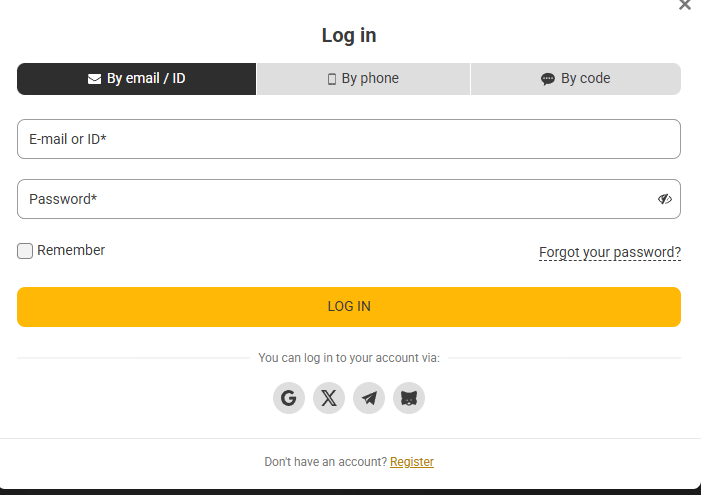
How to log in to MelBet.ph on desktop and the mobile app
-
1.
Open MelBet.ph or the app
Tap LOG IN in the top right corner.
-
2.
Choose a method
Select e-mail/ID, phone or code.
-
3.
Enter credentials
Type your login and password; tick Remember on a private device.
-
4.
Log in
Press LOG IN. Enable two-factor authentication in your profile for extra security.
MelBet login problems: forgotten password, blocked account and mirror access
| Problem | Fix |
|---|---|
| Forgot password | Click "Forgot your password?" and reset via e-mail or SMS. |
| Wrong ID | Your account ID is in the registration e-mail/SMS. |
| Site not loading | Use the official app or mobile version, clear cache or try another network. |
| Account blocked | Contact 24/7 support at 180013220481 or live chat. |
Frequently asked questions
What is my MelBet ID?
A numeric account number you receive after registration; it can be used instead of e-mail to log in.
Is the MelBet app login the same as the website?
Yes, the same credentials work on the website, mobile version and apps.
Written by
MelBet.ph Editorial Team
Betting & casino content editors. Our editors register, deposit and test every feature described on this site with a real Philippine account in PHP before publishing. Every page is fact-checked against the official MelBet terms.
Reviewed by
MelBet.ph Compliance Desk
Licensing & responsible gaming review. Reviews licence data, bonus terms and responsible gaming information for accuracy on every update.
Last reviewed: · Editorial policy